LingoVela vs Naver Papago on iPhone: Japan, Korea & Asian travel translation compared
Travelers heading to Seoul or Tokyo routinely hear one piece of advice: install Naver Papago for Korean and Japanese menus, street signs and honorific toggles. That advice holds up—and pairing free Papago for visual menus with LingoVela for extended two-way spoken conversations gives you both camera OCR and OpenAI-powered conversational nuance with local transcripts.
1. Spoken conversation nuance vs Korean/Japanese menu & honorific tools
Published by South Korea’s Naver Corp., Papago focuses heavily on Korean, Japanese, Chinese and Southeast Asian pairs—offering a dedicated honorific switch, image/menu OCR that overlays prices cleanly, handwriting input for kanji/hangul and website translation.
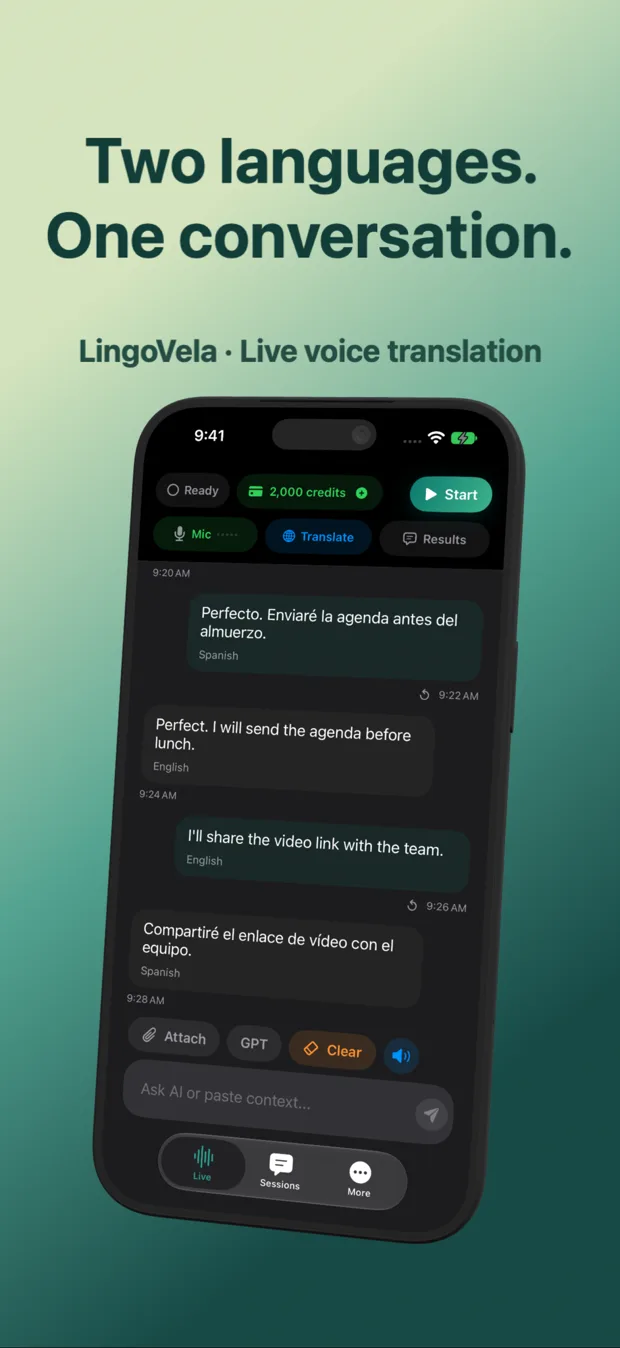
LingoVela focuses on the live two-way spoken conversation itself. In OpenAI Online mode, conversational Japanese, Korean and Mandarin benefit from context-aware speech and LLM phrasing while showing both original script and English (or your chosen language) clearly on screen so a host can read the characters directly if a noisy izakaya drowns out audio.
| Capability | LingoVela: Live Translate | Naver Papago (iOS) |
|---|---|---|
| Two-way live spoken conversation | Core screen with spoken output, speaker labels & local transcript | Conversation tab with dual-mic split view |
| Menu, sign & packaging image OCR | Not included | Strong camera/photo OCR especially on vertical Japanese & Korean menus |
| Handwriting / character drawing input | Not included | Included for drawing unfamiliar kanji / characters |
| Explicit honorific toggle | Natural register handled by model context | Dedicated honorific switch on supported pairs |
| Selectable OpenAI / PCC / On-Device modes | Yes — 3 distinct modes in one app | Naver cloud & offline text packs |
2. Offline subways, rural ryokans and data privacy
Underground metro stations, shinkansen tunnels and rural mountain guesthouses test offline readiness quickly. Papago provides offline text/phrase packs for core pairs, while live voice features typically expect network connectivity.
In LingoVela, you can prepare compatible On-Device speech and translation assets on hotel Wi-Fi before heading out, using 0 AI credits offline, and switch back to OpenAI Online or Private Cloud Compute once mobile data returns.
| Factor | LingoVela: Live Translate | Naver Papago (iOS) |
|---|---|---|
| Offline voice conversation | On-Device mode for compatible prepared pairs (0 AI credits, active sub) | Offline packs cover text/phrasebook; live voice relies on network |
| Account sign-in | None — anonymous device account | Optional Naver login |
| Mainland China connectivity note | OpenAI Online depends on reachable connection; test On-Device & roaming SIM rules beforehand | Check regional network reachability before relying on cloud features |
| Transcript storage | Stored locally on iPhone / iPad only | App history / favorites |
3. How to combine both apps on an Asia itinerary
Because Papago is free to install, there is no reason to choose only one icon on your home screen. Use each tool for the exact input path it was engineered for.
| Travel moment | Best app to open | Why |
|---|---|---|
| Scanning a handwritten izakaya menu or cosmetic label | Papago (or Google/Apple Camera) | Purpose-built photo OCR for Korean and Japanese scripts |
| Checking in with a guesthouse host or explaining dietary allergies in person | LingoVela | Clear two-way speech + readable native script on screen to double-check ingredients |
| Talking on a rural train with patchy eSIM signal | LingoVela (On-Device mode) | Prepared offline speech + translation uses 0 AI credits |
| Drawing a single kanji character from a wooden sign | Papago | Handwriting canvas recognizes stroke order |
Should I rely solely on voice translation for severe food allergies in Japan or Korea?
Never rely on unverified audio alone for medical risks. Show the translated written text on screen, carry a verified written allergy card in the local language and confirm explicitly.
Does OpenAI Online mode work everywhere in Mainland China?
Network access to external AI services varies in Mainland China depending on roaming eSIM routing vs local Wi-Fi. Always prepare On-Device assets before departure and check our China availability guide.
How much does it cost to keep both apps on my iPhone?
Papago is free; LingoVela Plus is $9.99/month in the US with 2,000 AI credits included.