LingoVela vs Google Translate on iPhone: live conversations, privacy modes and offline rules
Google Translate is the right free utility when you need camera menu scanning, website translation or quick lookups across more than a hundred written languages. LingoVela is built specifically for two-person spoken conversations on iPhone and iPad where you want explicit control over OpenAI Online, Apple Private Cloud Compute and zero-credit On-Device processing, with conversation history kept locally on your device.
1. Two-way conversation workflow and extra utilities
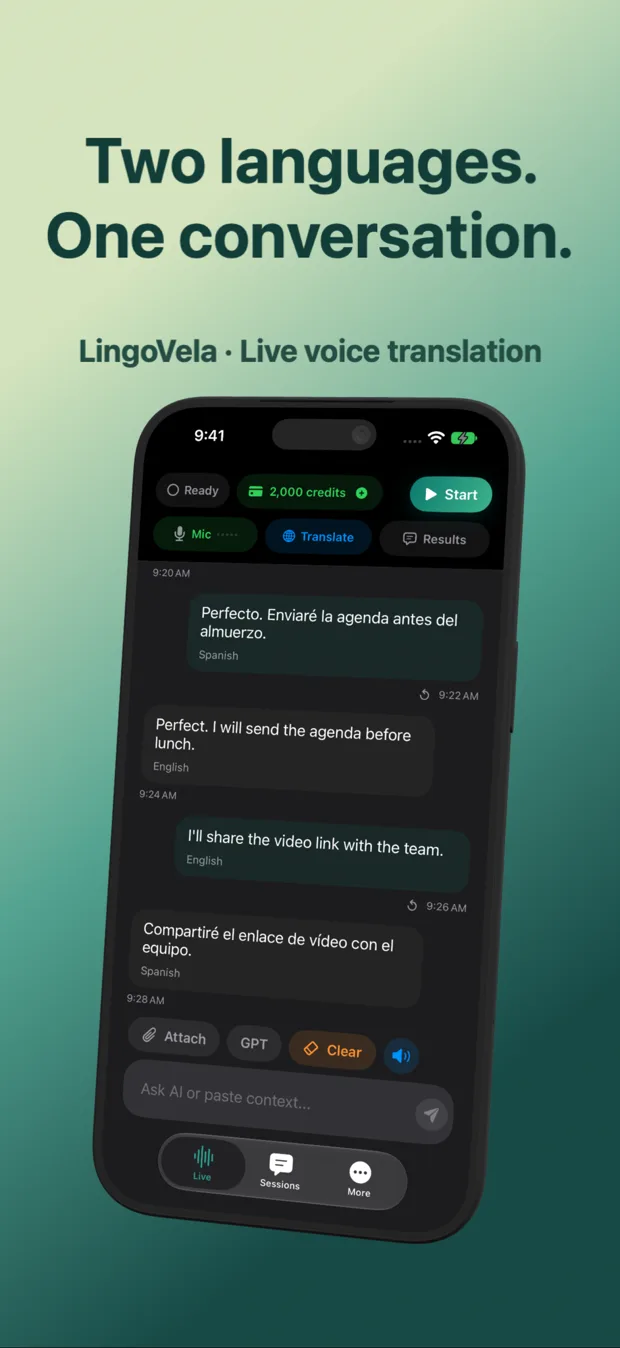
Google Translate bundles text boxes, camera/image translation, handwriting and separate speech screens (Conversation, Listening and Text-only) into one general-purpose app. LingoVela narrows the interface to one job: pick Speaker A and Speaker B languages, speak in both directions, hear spoken translations and read original plus translated lines on one shared transcript.
Because LingoVela does not include camera menu OCR or browser document import, many travelers keep Google Translate installed for signs and menus while using LingoVela when sitting down for an extended two-way conversation.
| Capability | LingoVela: Live Translate | Google Translate (iOS) |
|---|---|---|
| Two-way spoken conversation | Core screen: two selected languages, spoken output & dual-language text | Supported in Conversation mode for eligible language pairs |
| Readable conversation history | Saved locally on device with speaker labels, original & translated text | Recent lookups & saved phrases; optional Google account sync |
| Selectable AI / compute backend | Choose OpenAI Online, Private Cloud Compute or On-Device per session | Single Google cloud pipeline (or downloaded offline text pack) |
| Camera / menu / sign OCR | Not included (focused on voice & text conversation) | Built-in camera & photo translation |
| Website & document translation | Not included | Browser / paste workflows (document upload requires larger screen) |
| Minimum iOS requirement | iOS 26+ (iOS 27+ & Apple Intelligence for Private Cloud Compute) | Broad support across recent iOS versions |
2. Offline voice rules, data routing and sign-in
Downloading an offline translation pack in any app does not automatically prove two-way offline microphone speech works in both directions. In LingoVela, On-Device mode uses downloaded compatible translation models plus supported offline speech recognition without consuming AI credits, while still requiring an active subscription.
When connected, LingoVela lets you separate cloud providers explicitly: OpenAI Online sends voice and translation requests to OpenAI, whereas Private Cloud Compute transcribes speech locally on your device and sends text to Apple Private Cloud Compute after separate consent—never uploading raw audio to Apple in that mode.
| Dimension | LingoVela: Live Translate | Google Translate (iOS) |
|---|---|---|
| Sign-in required | No sign-in, no email, no API key (anonymous device account) | Optional Google Account (used for cross-device phrasebooks) |
| Cloud audio & text routing | Explicitly chosen by user: OpenAI Online or Apple Private Cloud Compute (text only) | Processed on Google servers when online |
| Offline speech recognition + translation | On-Device mode (0 AI credits; requires downloaded models, supported offline speech & active sub) | Offline packs target text/camera first; test airplane-mode voice per pair |
| Where conversation transcripts live | On your iPhone or iPad only | Local history or synced to Google Account if signed in |
| Visible usage meter | Live AI credit balance shown in app; unused session reservation refunded | No credit meter (free consumer service) |
3. Pricing and when each app is the better choice
Google Translate costs nothing to download or use, making it unbeatable for zero-budget trips, camera translation and rare written languages. LingoVela requires LingoVela Plus ($9.99/month in the US, including 2,000 AI credits per month, with optional $4.99 and $19.99 credit packs) because it funds direct OpenAI model usage and dedicated multi-mode engineering without advertising or user profiling.
| Scenario or question | Recommended tool | Why |
|---|---|---|
| Reading restaurant menus, street signs or train boards | Google Translate (or Apple Camera) | Built-in live camera overlay handles printed prices and scripts |
| Zero-cost occasional travel phrases | Google Translate | Free to install and use with no subscription |
| Extended two-person talk with local-only transcript & no account | LingoVela | Anonymous device setup, clear two-speaker log and explicit compute mode control |
| Switching between OpenAI cloud quality and 0-credit offline mode | LingoVela | One app lets you reserve AI credits for tough exchanges and switch to On-Device offline |
| Telephone calls or certified medical/legal interpretation | Neither app alone | Use a dedicated call-bridging platform or qualified human interpreter |
Can LingoVela replace Google Translate completely on a trip?
Keep both if you also need camera translation for menus and signs. LingoVela focuses on live two-way voice conversations and local transcripts rather than camera OCR.
Does LingoVela use AI credits when translating offline?
No. On-Device mode uses 0 AI credits once compatible language and speech assets are downloaded, though an active LingoVela Plus subscription is still required.
Is LingoVela already live on the App Store?
LingoVela: Live Translate is published by Arte Soft EOOD with its App Store release currently in preparation.