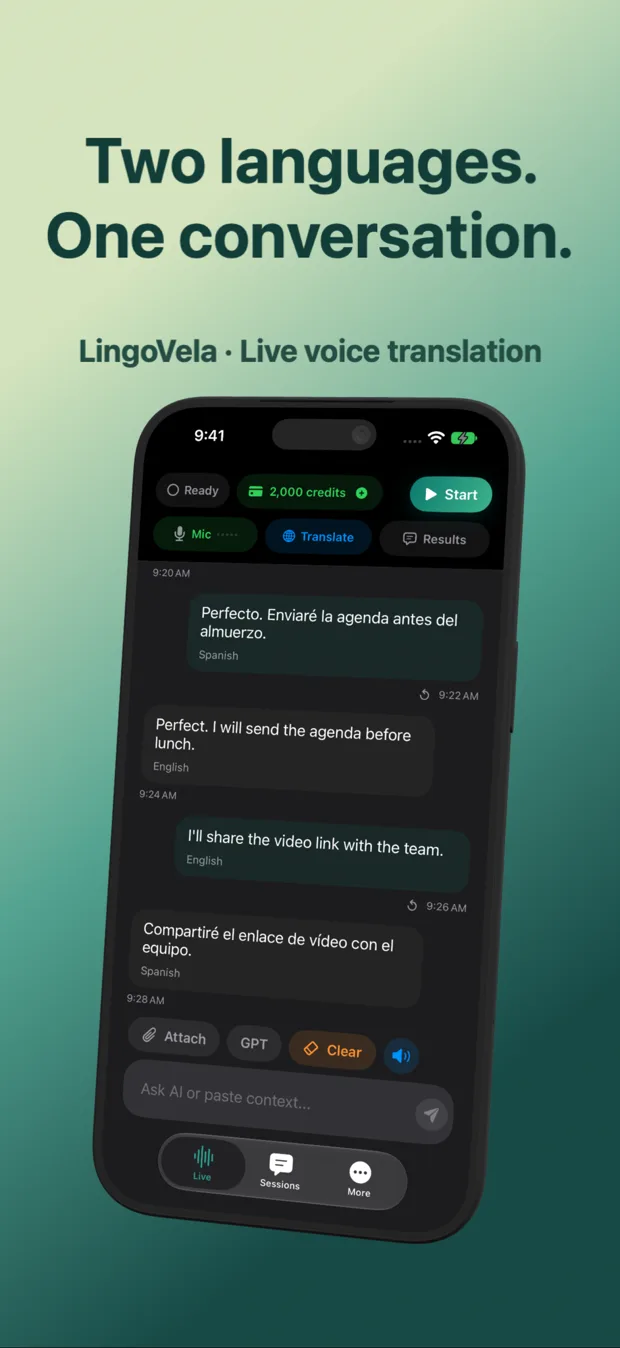
LingoVela vs Google Gemini Live on iPhone: two-way translator vs conversational AI
Google Gemini Live can converse fluently across dozens of languages on iPhone, making it tempting to use as an ad-hoc voice interpreter. In real two-person exchanges, however, Gemini Live behaves like a conversational assistant—answering questions instead of translating them, requiring a Google account and stopping completely without internet—whereas LingoVela is purpose-built for two-speaker translation with readable transcripts and offline fallback.
1. Interpreter discipline vs open-ended AI chat
In Gemini Live, you speak to an AI persona that expects to participate in the conversation. Even after instructing it to translate between two speakers, pauses, follow-up questions or idioms often trigger helpful AI explanations rather than verbatim translation.
LingoVela locks the session to one job: translating between Speaker A’s language and Speaker B’s language with spoken output and side-by-side readable text so both people can verify numbers, times and names.
| Criterion | LingoVela: Live Translate | Google Gemini App (Gemini Live) |
|---|---|---|
| Primary role | Dedicated two-language conversation translator | General-purpose conversational AI assistant |
| Prompt setup required | Zero — choose two languages and start | Requires spoken/typed prompt to act as interpreter |
| Risk of assistant answering instead of translating | Minimal — translation-only workflow | Common when speakers ask direct questions |
| Live dual-language screen verification | Shows original & translated text clearly during talk | Audio-centric Live screen; transcript inspected after |
| Brainstorming, trip planning & Q&A | Not a general chatbot | Strong itinerary & general knowledge assistant |
2. Offline operation, Google account login and Private Cloud Compute
Gemini Live on iPhone requires signing into a Google Account and maintaining an active internet connection. LingoVela requires no login and gives iPhone users three distinct compute paths—OpenAI Online, Apple Private Cloud Compute (iOS 27+) and 0-credit On-Device offline translation.
| Dimension | LingoVela: Live Translate | Google Gemini Live (iOS) |
|---|---|---|
| Account login required | None (anonymous device account) | Google Account required |
| Works offline in Airplane Mode | Yes — On-Device mode for prepared compatible pairs | No — requires live cloud connection |
| Apple Private Cloud Compute support | Yes (iOS 27+ & Apple Intelligence; text-only after consent) | No |
| Transcript storage location | Locally on your iPhone / iPad | Google Gemini Apps Activity cloud history |
3. Subscription cost and when each app makes sense
Use Gemini Live when you want a voice partner to practice speaking solo or brainstorm travel plans. Choose LingoVela when standing across from a real person who needs reliable turn-by-turn translation.
| Scenario | Better tool | Why |
|---|---|---|
| Real two-person talk at a counter, rental desk or family table | LingoVela ($9.99/mo) | No prompt drift, readable dual text and offline backup |
| Solo conversational practice or asking cultural travel questions | Gemini Live (Free / Google One AI Premium ~$19.99/mo) | Designed as an interactive AI partner |
| Privacy-sensitive talk with no cloud account identity | LingoVela | Anonymous device setup + On-Device / PCC modes |
Is Google Gemini Live the same app as Google Translate on iPhone?
No. Gemini Live lives inside the Google Gemini AI assistant app, whereas Google Translate is a separate translation utility with dedicated Conversation and Camera modes.
Can LingoVela work when roaming data drops?
Yes, if you prepared a compatible language pair for On-Device mode while online and have an active subscription.
Does LingoVela require a Google or OpenAI login?
Neither. Billing and credits attach to an anonymous device account through the App Store.