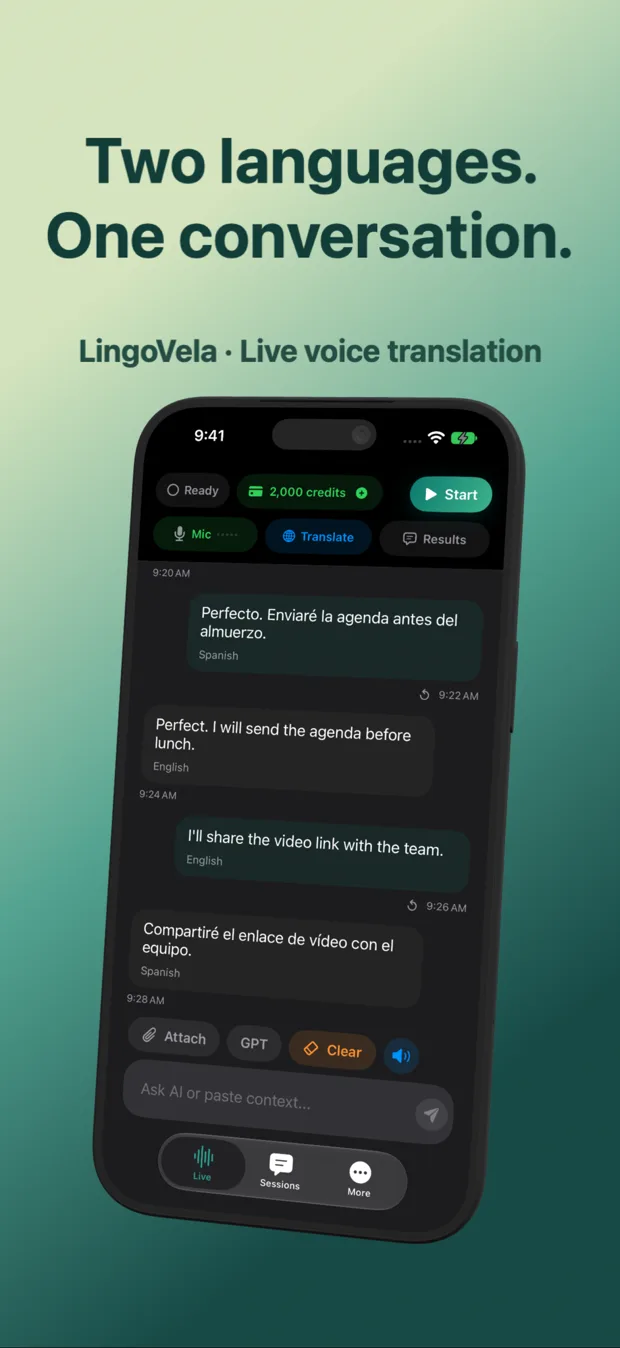
LingoVela vs Apple Translate on iPhone: face-to-face mode vs OpenAI and Private Cloud Compute
Apple Translate comes preinstalled on every iPhone, costs nothing, integrates with system-wide text selection and offers a clean face-to-face view with downloadable on-device languages. LingoVela adds what Apple’s stock app does not: selectable OpenAI Online voice translation, optional Apple Private Cloud Compute text translation, persistent local conversation history with speaker labels and visible AI credit metering.
1. Conversation interface and iOS integration compared
Apple Translate is tightly woven into iOS: it powers Safari page translation, camera translation, system text-selection popups and an in-person Conversation tab with side-by-side or face-to-face cards. Because it is already on your phone, it should always be the baseline you test first.
LingoVela focuses exclusively on the live two-way conversation screen and the record it leaves behind. Where stock utilities treat spoken exchanges as transient bubbles, LingoVela keeps readable conversation history locally on your iPhone or iPad with both original words and translated replies labeled by speaker.
| Feature | LingoVela: Live Translate | Apple Translate |
|---|---|---|
| Two-way spoken conversation | Dedicated two-speaker screen with spoken output & live transcript | Conversation tab with side-by-side or face-to-face orientation |
| Persistent conversation history | Saved locally on device with original + translated text & speaker labels | Favorites & recent phrases rather than structured multi-turn session logs |
| System-wide text selection & Safari | Not a system sheet replacement | Built into iOS selection menu and Safari page translation |
| Camera & photo text translation | Not included | Built into Camera tab and Live Text |
| Supported devices | iPhone & iPad (iOS 26+) | iPhone & iPad (built into modern iOS/iPadOS) |
2. Translation engines: stock neural packs vs three selectable modes
Apple Translate uses Apple’s supported translation language list—either online or via On-Device Mode when both languages are downloaded in Settings. That list is curated and reliable for major pairs, though smaller than cloud LLM coverage.
LingoVela gives you three distinct engines inside one app: OpenAI Online for conversational nuance across OpenAI-supported languages, Private Cloud Compute (on iOS 27+ with Apple Intelligence) where locally transcribed text goes to Apple PCC after separate consent without uploading raw audio, and On-Device mode using compatible downloaded models with zero AI credit spend.
| Architecture detail | LingoVela: Live Translate | Apple Translate |
|---|---|---|
| OpenAI LLM translation option | Yes — OpenAI Online mode included (uses AI credits) | No |
| Apple Private Cloud Compute mode | Yes — local speech transcription + PCC text request after consent (iOS 27+) | Uses Apple standard cloud or On-Device language packs |
| On-device offline translation | Yes — compatible downloaded models + offline speech (0 AI credits, active sub) | Yes — toggle On-Device Mode after downloading both language packs |
| User sign-in / profile | No sign-in; anonymous device account manages subscription & credits | Tied to iPhone setup; no separate app login |
| Raw audio handling in PCC / offline | Never uploaded in On-Device; raw audio not sent to Apple in PCC mode | Stays on device when On-Device Mode is enabled |
3. Cost vs value: when to stick with Apple Translate and when to add LingoVela
If Apple Translate supports both of your languages well and you do not need OpenAI conversational models or saved multi-turn transcripts, staying with the free built-in app is the sensible choice. LingoVela earns its $9.99/month subscription when you want OpenAI Online quality for idiomatic speech alongside an offline zero-credit fallback in the same conversation log.
| Need | Best choice | Reason |
|---|---|---|
| Free built-in translation for supported major languages | Apple Translate | $0 cost, preinstalled, supports offline packs and camera Live Text |
| OpenAI-powered phrasing for nuanced family or supplier talks | LingoVela | OpenAI Online handles conversational phrasing without needing API keys or prompts |
| Reviewing full original + translated dialogue after a conversation | LingoVela | Keeps structured local conversation history with speaker labels on device |
| Offline backup without depleting monthly AI credits | LingoVela (or Apple Translate) | LingoVela On-Device mode uses 0 credits while keeping sessions in one app |
Is LingoVela affiliated with Apple or OpenAI?
No. LingoVela is independently published by Arte Soft EOOD. Apple and OpenAI provide underlying platform and AI technologies without endorsing the app.
Why does Private Cloud Compute in LingoVela require iOS 27+?
Private Cloud Compute mode relies on compatible Apple Intelligence hardware, OS support (iOS 27+), separate user consent and available Apple usage quota.
Can I use Apple Translate for menus and LingoVela for conversations?
Yes. Using Apple Live Text / Camera for printed menus and LingoVela for spoken two-way conversations avoids paying credits on static signs.