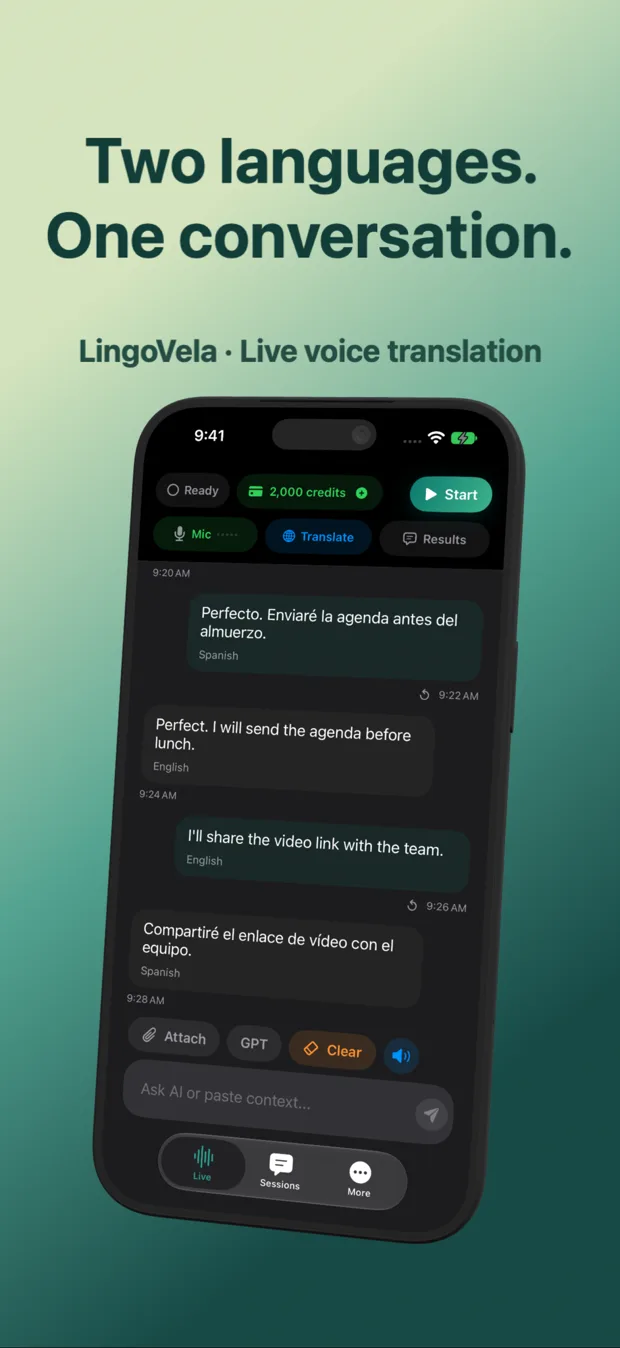
LingoVela vs iTranslate Voice on iPhone: AI credit transparency, offline speech and privacy
iTranslate is one of the longest-running third-party translation brands on the App Store, offering dictionary lookups, camera tools, phrasebooks and paid Pro voice/offline tiers across multiple apps. LingoVela takes the opposite product philosophy: one focused iPhone/iPad app for live two-way voice conversation, three transparent compute modes, no sign-in and plain monthly pricing.
1. Single-purpose live conversation vs multi-app utility suite
On the App Store, iTranslate spans flagship iTranslate Translator, iTranslate Voice and Converse workflows—mixing dictionaries, verb conjugations, camera translation and tap-to-speak voice tools. That breadth suits learners who want a pocket dictionary alongside occasional voice lookups.
LingoVela skips dictionaries, ads and upsell banners inside free modes. Because translation requires an active subscription from the start, the entire app opens directly into two-way conversation with readable dual-language history.
| Capability | LingoVela: Live Translate | iTranslate (Translator / Voice) |
|---|---|---|
| Core workflow | Live two-way voice translation + readable dual-language transcript | All-in-one text, dictionary, camera, phrasebook & Pro voice |
| Selectable AI backends | OpenAI Online, Apple Private Cloud Compute, On-Device | Provider-managed cloud & Pro offline packs |
| Verb conjugations & dictionary | Not included | Included in flagship iTranslate app |
| Camera / photo translation | Not included | Included in paid / Pro features |
| Conversation history storage | Local on-device transcript with clear speaker labels | Phrasebook / history features within app |
2. Offline mode rules, privacy and sign-in
Both LingoVela and iTranslate require paid access for full voice and offline capabilities, so checking what works in airplane mode before boarding a flight matters. In LingoVela, On-Device mode uses compatible downloaded models and supported offline speech recognition with zero AI credit consumption.
Privacy is equally explicit in LingoVela: there is no email registration, no social login and no ad SDK—only an anonymous device account that tracks your App Store subscription and AI credit balance.
| Factor | LingoVela: Live Translate | iTranslate |
|---|---|---|
| User registration | None — anonymous device account | Optional account / Apple subscription |
| Offline speech + text cost | Included with active $9.99/mo subscription at 0 AI credits | Requires active iTranslate Pro subscription & supported offline pair |
| Private Cloud Compute support | Yes (iOS 27+ & Apple Intelligence; text-only after consent) | Not offered |
| Raw audio visibility | User chooses OpenAI Online vs local speech + PCC vs pure On-Device | Processed via iTranslate cloud providers when online |
3. Subscription clarity and credit packs
Travelers frequently complain about trial renewals or unclear weekly/annual tiers across utility apps. LingoVela publishes its exact US pricing on its website and pricing page: $9.99/month with 2,000 AI credits, plus optional one-time top-ups of 1,000 credits ($4.99) or 5,000 credits ($19.99) if a heavy trip needs extra OpenAI Online time.
| Use case | Better match | Why |
|---|---|---|
| Month-to-month live conversation with OpenAI speech & local logs | LingoVela | Clear $9.99/mo plan, visible credit balance and zero sign-in |
| Dictionary lookups, verb tables and camera scanning in one subscription | iTranslate Pro | Includes reference dictionary and camera tools LingoVela omits |
| Privacy-sensitive talks where raw audio should not leave the phone | LingoVela | Switch to On-Device mode or Private Cloud Compute (local transcription) |
Does LingoVela have a weekly subscription trap?
No. LingoVela Plus is billed monthly ($9.99/month in the US, auto-renewing until cancelled in Apple Account Settings), with optional one-time credit packs.
Do unused one-time credit packs require an active subscription?
Yes. An active LingoVela Plus subscription is required to use all translation modes, including optional 1,000- and 5,000-credit top-up packs.
How do I test offline voice before traveling?
Download the required models while on Wi-Fi, turn on Airplane Mode with Wi-Fi off, and run a two-way test exchange in both directions.