iPad vs iPhone conversation translators compared: desk, reception & family setups
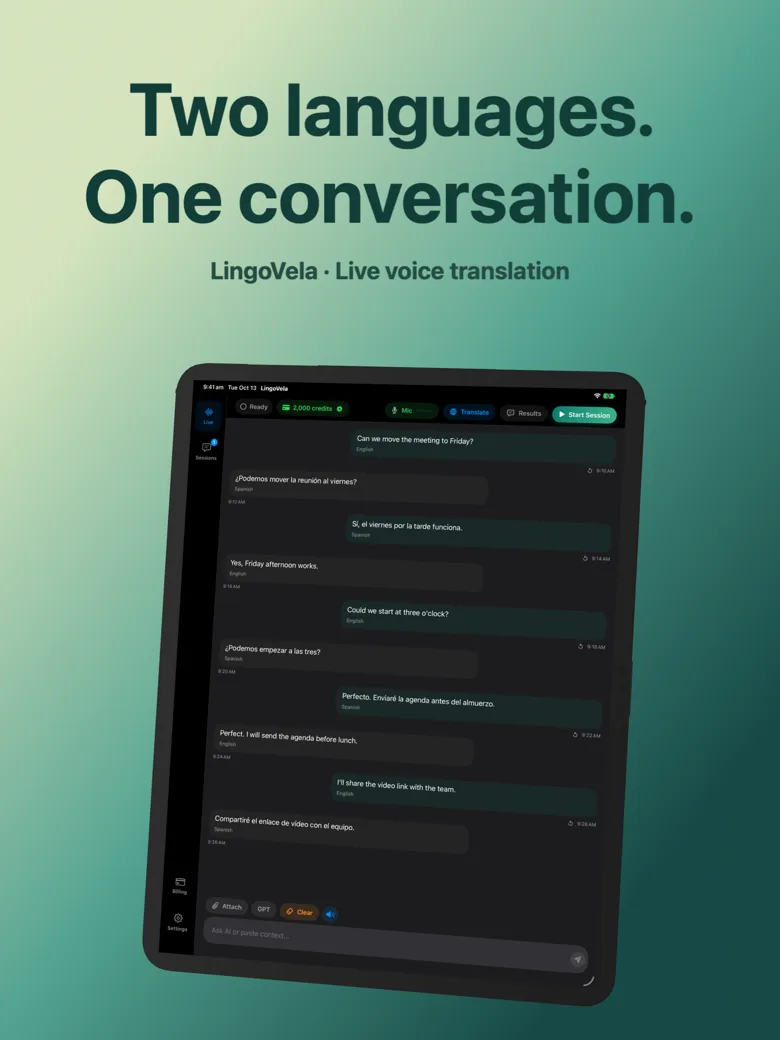
An iPad placed on a stand or table between two seated speakers turns live translation from a cramped phone-passing exercise into a calm, readable shared display—especially for older relatives, reception desks and client consultations. Yet surprisingly few translation apps ship a clean native iPad layout; LingoVela supports both iPhone and iPad natively on iOS/iPadOS 26+.
1. Native iPad apps vs stretched iPhone layouts
Several popular pocket translator apps were designed strictly for portrait iPhones, rendering awkward stretched columns or tiny fonts on an 11-inch or 13-inch iPad. LingoVela builds natively for both iPhone and iPad with dedicated iPad typography and readable two-speaker conversation history.
| App | Native iPadOS interface | Readability across a 3-foot desk | Offline On-Device support on iPad | Account sign-in |
|---|---|---|---|---|
| LingoVela: Live Translate | Yes — native iPhone & iPad design (iPadOS 26+) | Excellent — large serif/Plex typography & speaker labels | Yes — 0-credit On-Device mode (active sub) | None (anonymous device) |
| Apple Translate | Yes — native iPadOS app incl. face-to-face view | Very good | Yes — downloaded language packs | Apple Account on iPad |
| Google Translate | Universal iOS/iPadOS app + browser docs | Good | Offline text packs; verify voice | Optional Google login |
| Phone-only utility translators | Run in letterboxed 1x/2x compatibility window | Poor from arm’s length | Varies | Varies |
2. iPad vs iPhone: which device fits each physical space?
If you own both an iPhone and an iPad on the same Apple Account, restore your LingoVela subscription in the app and pick the screen size that fits the room.
| Environment | Better device | Why |
|---|---|---|
| Seated kitchen-table visit with grandparents or in-laws | iPad on table stand | Larger text, louder speakers and zero phone-passing |
| Consultant, real-estate agent or boutique reception desk | iPad (with Guided Access if shared) | Looks professional and lets both sides verify numbers comfortably |
| Walking tours, train platforms, taxis & markets | iPhone | One-handed pocket convenience and cellular eSIM always on |
3. Setting up an iPad for effortless tabletop translation
A folio stand angled at 45–60 degrees keeps the iPad’s microphones unobstructed (unlike laying it flat on a tablecloth next to clinking plates) and lets both seated speakers read comfortably.
| Detail | What to avoid | Recommended practice |
|---|---|---|
| Microphone placement | Laying iPad flat next to coffee cups or laptop fan | Prop on folio stand equidistant (~40–60 cm) from both speakers |
| Wi-Fi-only iPad on field visits | Opening online mode at a site with no Wi-Fi | Hotspot from iPhone OR pre-download LingoVela On-Device models |
| Private Cloud Compute on iPad | Assuming older A-series iPad supports PCC | Requires M-series / Apple Intelligence iPad running iPadOS 27+ |
Do I have to pay twice to use LingoVela on my iPhone and iPad?
You can restore your active Apple Account subscription inside the app; check the in-app balance and subscription terms on your devices.
Does a Wi-Fi-only iPad support LingoVela’s On-Device mode away from home?
Yes—activate your subscription and download compatible On-Device language and speech models on home Wi-Fi before leaving.
Which iPad models support Private Cloud Compute mode?
Private Cloud Compute requires iPadOS 27+ and an iPad model compatible with Apple Intelligence, plus internet and AI credits.