Gliglish AI Speaking Practice Review & Native iPhone Alternatives (2026)
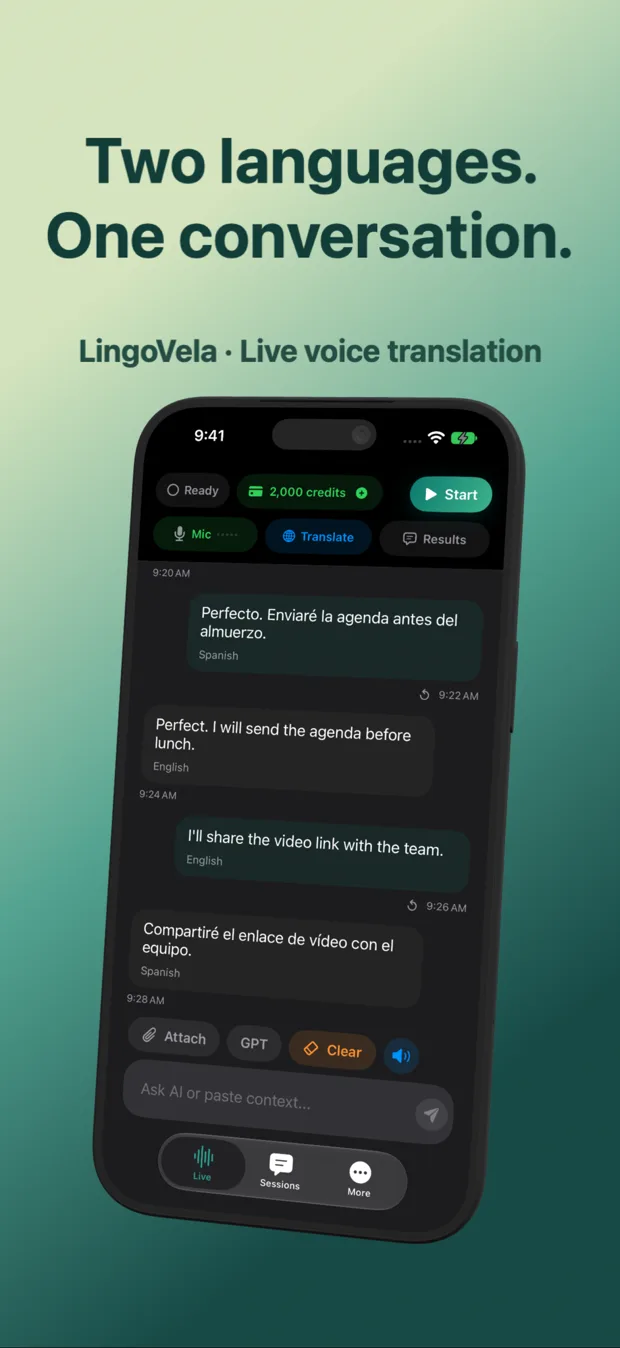
Gliglish is well known for instant browser roleplay prompts with spoken speed controls and grammar hints, yet travelers, expats, and language learners regularly discover a sharp boundary when a real two-person conversation starts: running inside mobile Safari introduces microphone permission prompts, zero offline packs, and a $29/mo price tag. Here is how Gliglish compares with LingoVela's live two-way voice translation, Private Cloud Compute, and On-Device offline modes on iPhone and iPad in 2026.
What Gliglish does well—and where real-world conversations differ
As a web-browser AI language speaking partner, Gliglish focuses on instant browser roleplay prompts with spoken speed controls and grammar hints. That design makes sense when quick desktop browser speaking drills without installing an app.
Real conversations across a hotel desk, clinic reception, landlord kitchen, or supplier showroom impose different constraints: two real people take unscripted turns, numbers and negations must be readable by both sides simultaneously, cellular signal may drop inside subways or flights, and neither person wants to create a new social profile just to exchange five sentences.
| Dimension | Gliglish | LingoVela: Live Translate |
|---|---|---|
| Core job | Web-browser ai language speaking partner | Live two-way spoken conversation & dual-script verification |
| 2026 pricing model | Limited free trial turns; ~$29/mo Gliglish Plus | $9.99/mo (2k AI credits) or $119.99/yr (48k AI credits) + $0-credit On-Device mode |
| Offline speech translation | Limited or lessons-only (verify per pair) | On-Device mode runs downloaded speech + translation models with 0 AI credits |
| Privacy & cloud options | Provider account & cloud processing | Anonymous device ID + choice of On-Device, Apple Private Cloud Compute, or OpenAI |
| Shared two-person table screen | running inside mobile Safari introduces microphone permission prompts, zero offline packs, and a $29/mo price tag. | Built for two speakers to read both source recognition and final translation |
Pricing math: recurring subscriptions, hidden tiers, and offline cost
Evaluating Gliglish (Limited free trial turns; ~$29/mo Gliglish Plus) requires separating marketing headlines from the exact plan that unlocks live voice. Many language and translation apps advertise a low entry tier while placing real-time AI speech or offline packs behind higher 'Max', 'VIP', or per-seat business upgrades.
LingoVela publishes one transparent structure on iPhone and iPad: $9.99/month includes 2,000 online AI credits, while $119.99/year includes 30,000 AI credits (2,500 per month). Crucially, once subscribed, LingoVela's On-Device mode translates supported downloaded language pairs using zero AI credits—ideal for all-day walking tours or flights.
- Check whether annual billing charges the entire year upfront after a 3-day or 7-day trial.
- Verify whether offline voice recognition and spoken TTS output work in Airplane Mode—not just offline text dictionaries.
- Test our free browser AI Translation Credits & Roaming Cost Calculator at /tools/ai-translation-credits-and-roaming-cost-calculator/ before your trip.
How to test both apps in 3 minutes before you travel or commit
Rather than trusting App Store banners, run one realistic two-turn spoken exchange on your own iPhone with the exact language pair you need.
- Speak a natural sentence containing a time, a price, and a negation (for example: 'We cannot check in before 7:30 PM, is luggage storage under 15 euros?').
- Inspect the recognized source words first—most 'bad translations' actually start with a misheard number or proper noun.
- Play the spoken reply in the target language and verify that someone across a noisy counter can both hear it and read the script.
- Toggle Airplane Mode on (Wi-Fi off) and test whether your offline fallback still completes both directions.
When to choose Gliglish, LingoVela, or both together
Keep Gliglish if your primary goal is quick desktop browser speaking drills without installing an app. Choose LingoVela—or keep LingoVela on your Home Screen alongside your study app—whenever you need dependable two-way live voice interpretation, no-account privacy, Apple Private Cloud Compute, and offline On-Device conversation recovery on iPhone or iPad.
Can LingoVela replace Gliglish completely?
They solve complementary jobs. Gliglish centers on instant browser roleplay prompts with spoken speed controls and grammar hints, whereas LingoVela is engineered specifically for live two-person bilingual conversations with On-Device offline, Apple Private Cloud Compute, and OpenAI modes.
Does LingoVela require creating an email account or entering an OpenAI API key?
No. LingoVela uses an anonymous device account with Apple App Store billing—no email registration, password, or personal API key management required.
Why do native iOS voice apps beat mobile web tabs for live speech?
Native iOS apps manage AVAudioSession background routing, AirPods Bluetooth profiles, and downloaded offline speech models reliably.